> ## Documentation Index
> Fetch the complete documentation index at: https://docs.callivox.com/llms.txt
> Use this file to discover all available pages before exploring further.
# Data Deletion
> How to delete data collected through WhatsApp, Instagram and Facebook channels in Callivox — for businesses using the platform and for the people who message them.
This page explains how data that Callivox receives through Meta platforms (WhatsApp, Instagram and Facebook Messenger) can be deleted. It covers both **businesses** that operate a Callivox workspace and **end users** — the people who message those businesses.
Messages and media received from Meta platforms are processed solely to provide the inbox service. Access tokens and other channel credentials are stored encrypted in a secret store.
## For businesses: delete or disconnect a Meta channel
A workspace admin can disconnect a WhatsApp, Instagram or Facebook channel at any time:
Go to **Settings → Channels** and locate the channel you want to remove.
Choose **Delete** on the channel. A confirmation dialog explains that this will disconnect the channel and cannot be undone.
Confirm the deletion. The action takes effect immediately.
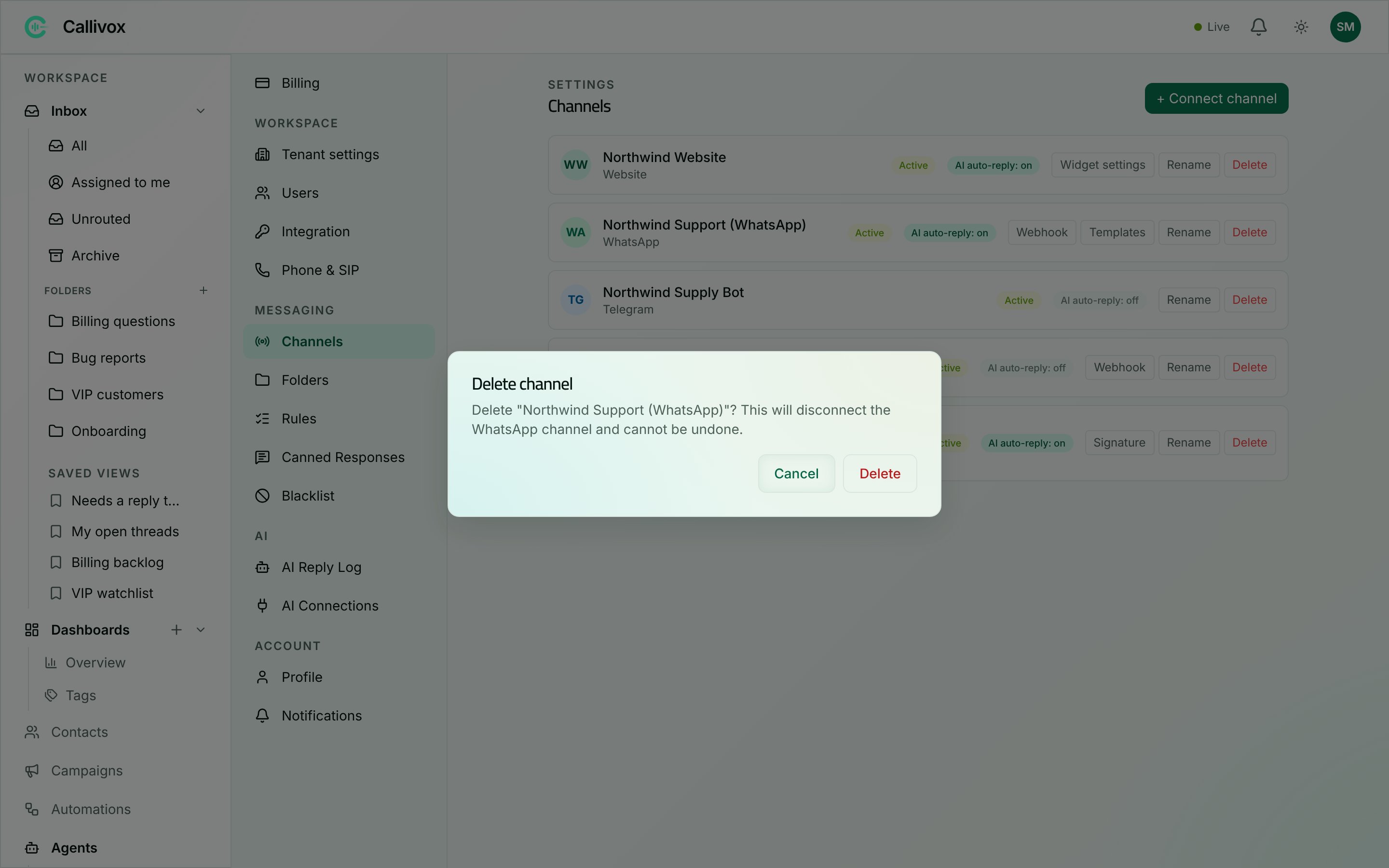 Deleting a channel does all of the following:
* **Stops all data flow** — the webhook subscription is deregistered with the provider (e.g. Meta), so no new messages or events are received.
* **Permanently deletes stored credentials and secrets** — access tokens, app secrets and any other channel credentials are removed from the secret store.
* **Deletes all channel account identities** — the per-customer identities on that channel (for example, the WhatsApp IDs and phone numbers of everyone who messaged), together with their links to contacts.
* **Is irreversible and audit-logged** — the deletion cannot be undone, and it is recorded in the workspace audit log.
Conversation transcripts remain in the workspace as the business's own records, but they are no longer linked to any live channel identity.
## For businesses: delete individual contacts
To remove a specific person's data:
1. Go to **Contacts** and open the contact.
2. Choose **Delete**.
This removes the person's profile record — name, phone, email, notes and their channel identities.
## For businesses: delete your entire workspace
To have your whole workspace and account deleted — including all conversation transcripts — contact support:
* [https://ha-consultancy.com/contact-us/](https://ha-consultancy.com/contact-us/)
* [hello@callivox.com](mailto:hello@callivox.com)
## For end users: request deletion of your data
If you have messaged a business on WhatsApp, Instagram or Facebook and that business uses Callivox, you can have your data deleted in either of two ways:
1. **Ask the business directly.** The business operating the workspace can delete your contact record and channel identity as described above.
2. **Email us.** Send a request to [hello@callivox.com](mailto:hello@callivox.com) and include the phone number or handle you used to message the business, so we can locate your data.
Deletion requests are completed within **30 days**.
Deleting a channel does all of the following:
* **Stops all data flow** — the webhook subscription is deregistered with the provider (e.g. Meta), so no new messages or events are received.
* **Permanently deletes stored credentials and secrets** — access tokens, app secrets and any other channel credentials are removed from the secret store.
* **Deletes all channel account identities** — the per-customer identities on that channel (for example, the WhatsApp IDs and phone numbers of everyone who messaged), together with their links to contacts.
* **Is irreversible and audit-logged** — the deletion cannot be undone, and it is recorded in the workspace audit log.
Conversation transcripts remain in the workspace as the business's own records, but they are no longer linked to any live channel identity.
## For businesses: delete individual contacts
To remove a specific person's data:
1. Go to **Contacts** and open the contact.
2. Choose **Delete**.
This removes the person's profile record — name, phone, email, notes and their channel identities.
## For businesses: delete your entire workspace
To have your whole workspace and account deleted — including all conversation transcripts — contact support:
* [https://ha-consultancy.com/contact-us/](https://ha-consultancy.com/contact-us/)
* [hello@callivox.com](mailto:hello@callivox.com)
## For end users: request deletion of your data
If you have messaged a business on WhatsApp, Instagram or Facebook and that business uses Callivox, you can have your data deleted in either of two ways:
1. **Ask the business directly.** The business operating the workspace can delete your contact record and channel identity as described above.
2. **Email us.** Send a request to [hello@callivox.com](mailto:hello@callivox.com) and include the phone number or handle you used to message the business, so we can locate your data.
Deletion requests are completed within **30 days**.