> ## Documentation Index
> Fetch the complete documentation index at: https://docs.callivox.com/llms.txt
> Use this file to discover all available pages before exploring further.
# Campaign reports
> Read a campaign's results — the five stat cards, per-recipient statuses and errors — and pause, resume or cancel a campaign in flight.
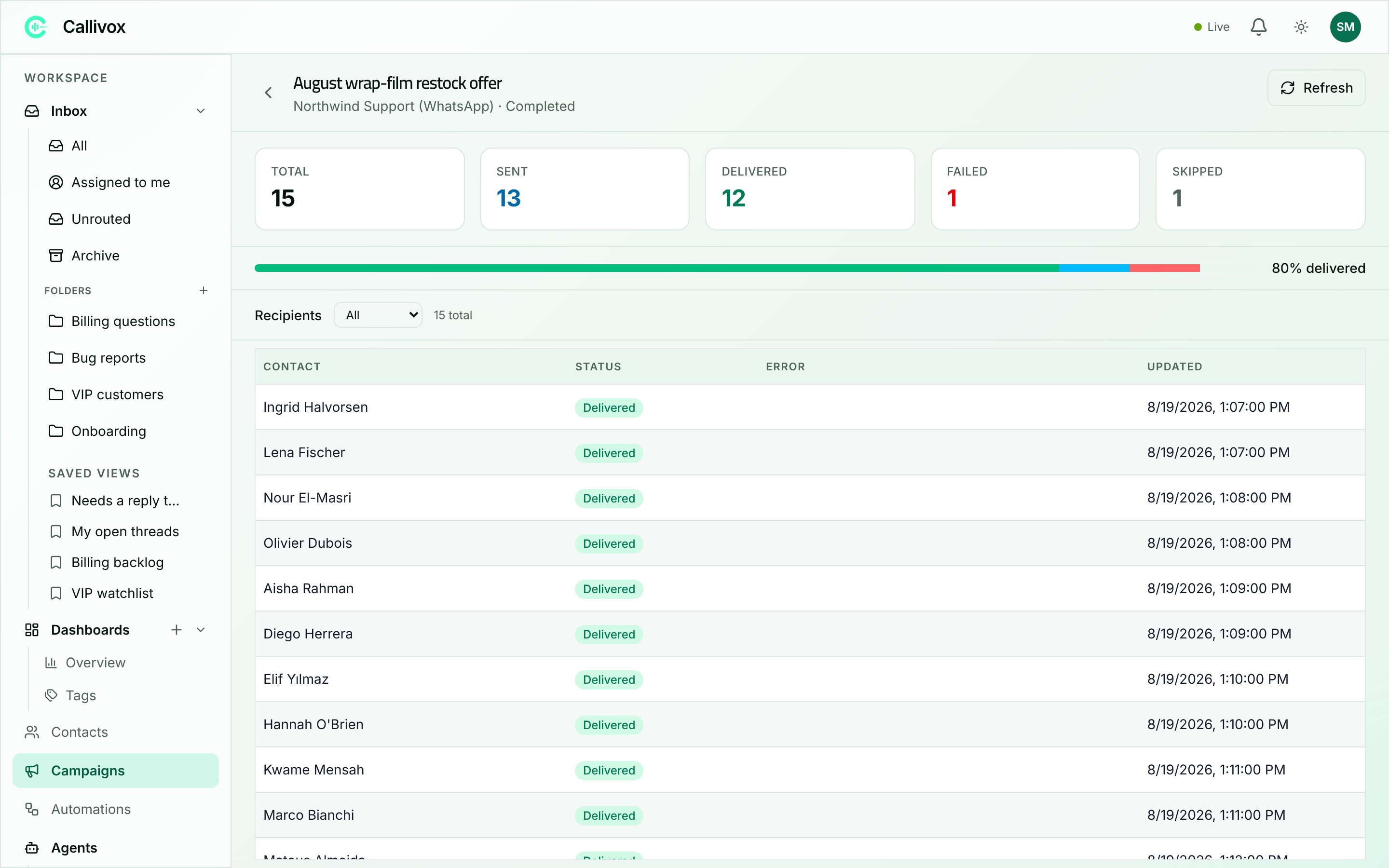
Every campaign has a report page. It opens automatically when you launch, and you can return to it any time by clicking the campaign's name in the list.
 ## The header
Across the top: the campaign's name, its channel and status, a **Refresh** button, and whichever of **Launch**, **Pause**, **Resume** and **Cancel** apply right now.
While a campaign is sending or scheduled a dot pulses beside the progress bar, and the numbers update as you watch.
## The five numbers
| Card | What it counts |
| ------------- | ---------------------------------------------------------------------------------------- |
| **Total** | Everyone the campaign resolved to at launch. This is the audience, fixed at that moment. |
| **Sent** | Messages handed to the channel. |
| **Delivered** | Messages the channel confirmed reached the recipient. |
| **Failed** | Messages that could not be delivered. Each carries a reason. |
| **Skipped** | Recipients the campaign passed over without attempting. |
Under them, a progress bar reads **N% delivered**.
There is no "read" or "replied" figure on this page. Whether an individual recipient read the message shows in the recipient list below; replies come back as ordinary conversations in your [inbox](/inbox/overview), where you can see how many arrived by filtering the list.
**Sent** and **Delivered** are not the same thing, and the gap between them is normal while a campaign is running. Sent means the message left Callivox; delivered means the messaging network confirmed it arrived. On some channels that confirmation comes back seconds later, on others it can take a while, and a recipient whose phone is off stays at sent until it comes back on.
## The recipient list
Below the cards, every recipient is listed with:
* **Contact** — their name, or "Unknown" when the address is not linked to a contact.
* **Status** — where their message got to.
* **Error** — why it failed. Long messages are shortened; hover to read the whole thing.
* **Updated** — when their status last changed.
The dropdown above the table filters by status — **All**, **Pending**, **Queued**, **Sent**, **Delivered**, **Read**, **Failed** or **Skipped** — and the list pages 50 at a time.
| Recipient status | Meaning |
| ---------------- | ------------------------------------------ |
| **Pending** | Waiting its turn. |
| **Queued** | Handed to the sending queue. |
| **Sent** | Passed to the channel. |
| **Delivered** | Confirmed as arrived. |
| **Read** | The recipient opened it. |
| **Failed** | It could not be delivered — see the error. |
| **Skipped** | Not attempted. |
## Reading a failure
Filter the list to **Failed** and read the **Error** column. The text comes from the messaging provider, so it says what actually went wrong rather than a generic message. What you usually find:
* **A bad or unreachable address** — the number is not on that service, or the account no longer exists. Fix the contact record, or remove them from future audiences.
* **The template was rejected** — a variable came through empty or malformed. Check the mapping on the campaign and the contact records feeding it.
* **The account cannot send** — something is wrong at the provider's end: a payment method missing, a limit reached, a permission withdrawn. Nothing on the Callivox side will fix it; sort it out with the provider and send to the failed recipients again in a new campaign.
A scattering of failures across a large send is normal — lists go stale. A campaign where nearly everything failed points at one shared cause, and the error text will be the same on every row.
Failures are isolated. One recipient failing never stops the campaign — the rest carry on, and you deal with the failures afterwards.
## Pausing, resuming and cancelling
* **Pause** stops a sending campaign between batches. Messages already sent have gone; nothing further goes out until you resume.
* **Resume** picks up where it stopped, with the same audience and settings.
* **Cancel** stops it for good. You are asked to confirm: "Cancel '\'? Any messages already sent won't be recalled."
Neither pausing nor cancelling can recall a message that has already been sent. If you spot a mistake mid-send, pause first — it is the fastest way to stop the damage spreading — and then decide whether to fix and resume, or cancel.
Cancel is available on anything that is not already completed or cancelled, including a scheduled campaign that has not started.
## Next steps
Build the next one.
What a campaign costs to send.
## The header
Across the top: the campaign's name, its channel and status, a **Refresh** button, and whichever of **Launch**, **Pause**, **Resume** and **Cancel** apply right now.
While a campaign is sending or scheduled a dot pulses beside the progress bar, and the numbers update as you watch.
## The five numbers
| Card | What it counts |
| ------------- | ---------------------------------------------------------------------------------------- |
| **Total** | Everyone the campaign resolved to at launch. This is the audience, fixed at that moment. |
| **Sent** | Messages handed to the channel. |
| **Delivered** | Messages the channel confirmed reached the recipient. |
| **Failed** | Messages that could not be delivered. Each carries a reason. |
| **Skipped** | Recipients the campaign passed over without attempting. |
Under them, a progress bar reads **N% delivered**.
There is no "read" or "replied" figure on this page. Whether an individual recipient read the message shows in the recipient list below; replies come back as ordinary conversations in your [inbox](/inbox/overview), where you can see how many arrived by filtering the list.
**Sent** and **Delivered** are not the same thing, and the gap between them is normal while a campaign is running. Sent means the message left Callivox; delivered means the messaging network confirmed it arrived. On some channels that confirmation comes back seconds later, on others it can take a while, and a recipient whose phone is off stays at sent until it comes back on.
## The recipient list
Below the cards, every recipient is listed with:
* **Contact** — their name, or "Unknown" when the address is not linked to a contact.
* **Status** — where their message got to.
* **Error** — why it failed. Long messages are shortened; hover to read the whole thing.
* **Updated** — when their status last changed.
The dropdown above the table filters by status — **All**, **Pending**, **Queued**, **Sent**, **Delivered**, **Read**, **Failed** or **Skipped** — and the list pages 50 at a time.
| Recipient status | Meaning |
| ---------------- | ------------------------------------------ |
| **Pending** | Waiting its turn. |
| **Queued** | Handed to the sending queue. |
| **Sent** | Passed to the channel. |
| **Delivered** | Confirmed as arrived. |
| **Read** | The recipient opened it. |
| **Failed** | It could not be delivered — see the error. |
| **Skipped** | Not attempted. |
## Reading a failure
Filter the list to **Failed** and read the **Error** column. The text comes from the messaging provider, so it says what actually went wrong rather than a generic message. What you usually find:
* **A bad or unreachable address** — the number is not on that service, or the account no longer exists. Fix the contact record, or remove them from future audiences.
* **The template was rejected** — a variable came through empty or malformed. Check the mapping on the campaign and the contact records feeding it.
* **The account cannot send** — something is wrong at the provider's end: a payment method missing, a limit reached, a permission withdrawn. Nothing on the Callivox side will fix it; sort it out with the provider and send to the failed recipients again in a new campaign.
A scattering of failures across a large send is normal — lists go stale. A campaign where nearly everything failed points at one shared cause, and the error text will be the same on every row.
Failures are isolated. One recipient failing never stops the campaign — the rest carry on, and you deal with the failures afterwards.
## Pausing, resuming and cancelling
* **Pause** stops a sending campaign between batches. Messages already sent have gone; nothing further goes out until you resume.
* **Resume** picks up where it stopped, with the same audience and settings.
* **Cancel** stops it for good. You are asked to confirm: "Cancel '\'? Any messages already sent won't be recalled."
Neither pausing nor cancelling can recall a message that has already been sent. If you spot a mistake mid-send, pause first — it is the fastest way to stop the damage spreading — and then decide whether to fix and resume, or cancel.
Cancel is available on anything that is not already completed or cancelled, including a scheduled campaign that has not started.
## Next steps
Build the next one.
What a campaign costs to send.