> ## Documentation Index
> Fetch the complete documentation index at: https://docs.callivox.com/llms.txt
> Use this file to discover all available pages before exploring further.
# Billing overview
> How a Callivox subscription and your credit balance fit together, and where to manage both in the app.
Callivox billing has two parts: a **plan**, which is what you subscribe to each month, and a
**credit balance**, which is what your AI work draws down. Your plan grants credits every month;
credits are spent as AI agents answer conversations, take calls and read documents.
 ## The mental model
A monthly subscription. It sets your monthly credit grant, how many automation runs you get,
which channels and features you can use, and your user and channel limits.
A spendable balance. Credits arrive with each monthly payment, and are consumed when an AI
agent answers a conversation, handles a call or ingests a knowledge-base document.
Two things follow from this that catch people out:
* **Unused credits roll over.** Each monthly payment adds its grant to whatever you already have —
it does not reset your balance to the monthly figure.
* **Running out of credits does not cancel your plan**, and cancelling your plan does not remove
credits you have already bought. They are separate.
## Where to find it
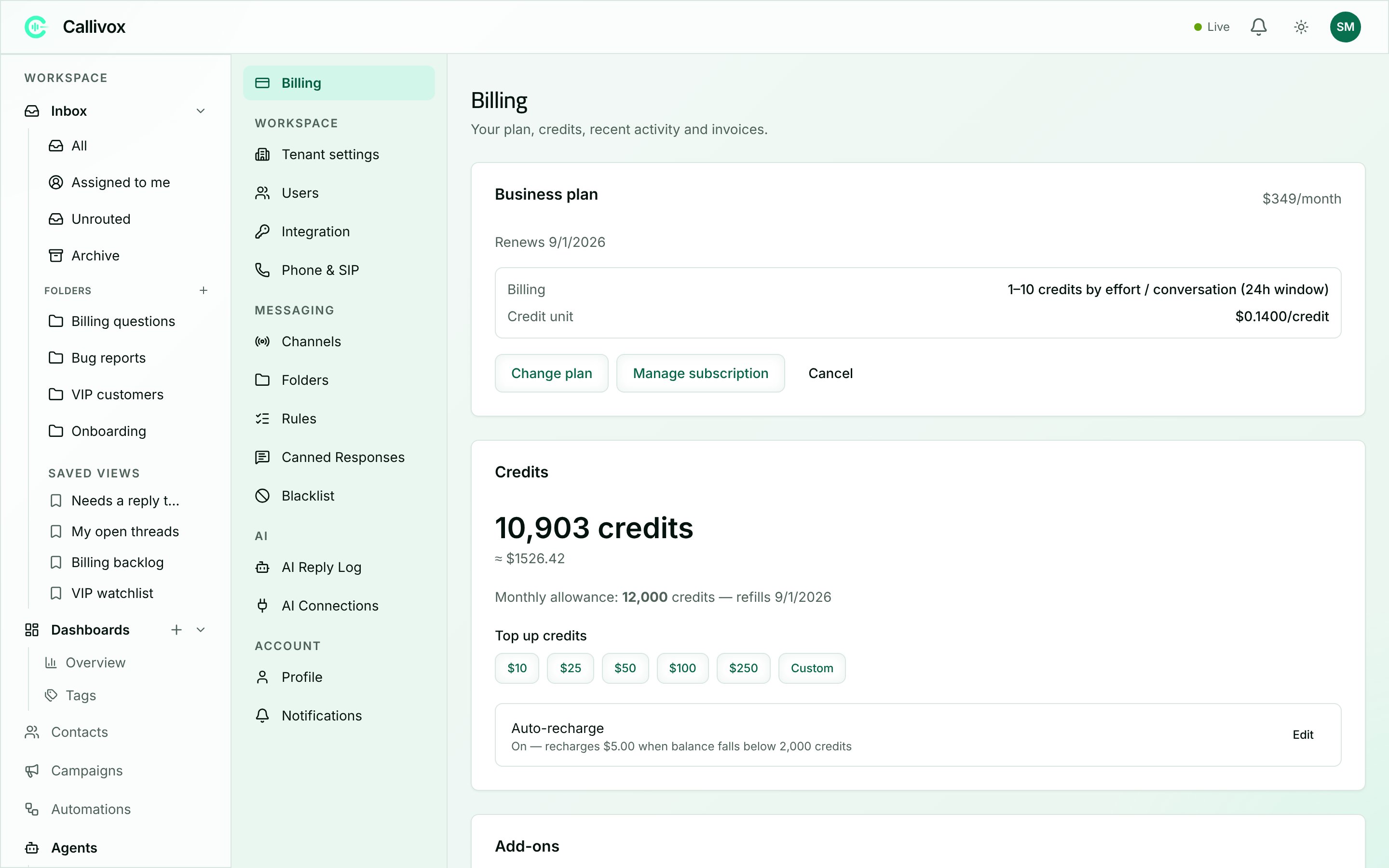
Go to **Settings → Billing**. The page header reads *"Your plan, credits, recent activity and
invoices."*
Billing is **Admin-only**. Members do not see the Billing pages, and only Admins can subscribe,
change plans, buy credits or turn on auto-recharge. Members will still see an in-app warning if
the workspace runs out of credits, because it affects their work in the inbox.
## What the page shows
| Section | What it tells you |
| ------------------- | -------------------------------------------------------------------------------------------------------------------------------------------------------------------------------------------------------------------------------------------------------- |
| **Plan card** | Your current plan and price, when it renews, and a status badge (**Trial**, **Past due**, **Suspended**, **Cancelled**). Also shows your billing rate — for example *"1–10 credits by effort / conversation (24h window)"* — and your credit unit price. |
| **Credits card** | Your credit balance and its approximate value in your currency, your monthly allowance and refill date, and buttons to **Top up credits** and edit **Auto-recharge**. |
| **Add-ons** | Optional recurring extras, such as extra seats or extra channel connections, that raise your plan's limits. |
| **Recent activity** | The credit ledger: every grant, top-up and charge, newest first. |
| **Invoices** | Your past invoices, with links to the hosted receipts. |
The plan card's buttons are **Change plan**, **Manage subscription** (which opens the payment
portal where you can update your card) and **Cancel**. If you have never subscribed, the card
reads **"No active plan"** with a **Pick a plan** button instead.
## Your trial
New workspaces start on a 14-day **Trial** with **100 credits** included. While you are trialing:
* A chip in the top bar shows **Trial — N days left** and links to **Settings → Billing**.
* From three days out, a banner appears: *"Your trial ends in N days. Pick a plan to keep your
account active."*
When the trial ends without a subscription, the workspace moves to the **Free** plan. The Free
plan grants no monthly credits, so AI work stops once the balance is used up — but any credits you
still hold are not taken away, and everything you have set up stays in place. Subscribing to a
paid plan at any point restores full service.
You can subscribe before the trial ends. See [Plans](/billing/plans) for what each plan includes.
## If your billing is handled by an account manager
Some workspaces — typically Enterprise customers paying by bank transfer — are billed offline. On
those workspaces the plan card, top-up buttons, auto-recharge and the whole plans page are
replaced by a single line:
> **Billing is managed by your account manager.**
Contact them to change plans or buy credit. Everything else in this section still describes how
your credits are consumed.
## Billing currency
Callivox bills in **USD**, **AED** or **SAR**. You pick your currency at your first checkout, and
it is locked for as long as you have an active subscription. The currency selector on the plans
page is disabled in that case, with the tooltip *"Billing currency is locked to your active
subscription."*
## Next steps
The conversation window, effort tiers, rates and worked examples.
What each plan includes, and how to change plan.
Buying more credits and keeping the balance topped up automatically.
The warnings you get, and exactly what stops working at zero.
## The mental model
A monthly subscription. It sets your monthly credit grant, how many automation runs you get,
which channels and features you can use, and your user and channel limits.
A spendable balance. Credits arrive with each monthly payment, and are consumed when an AI
agent answers a conversation, handles a call or ingests a knowledge-base document.
Two things follow from this that catch people out:
* **Unused credits roll over.** Each monthly payment adds its grant to whatever you already have —
it does not reset your balance to the monthly figure.
* **Running out of credits does not cancel your plan**, and cancelling your plan does not remove
credits you have already bought. They are separate.
## Where to find it
Go to **Settings → Billing**. The page header reads *"Your plan, credits, recent activity and
invoices."*
Billing is **Admin-only**. Members do not see the Billing pages, and only Admins can subscribe,
change plans, buy credits or turn on auto-recharge. Members will still see an in-app warning if
the workspace runs out of credits, because it affects their work in the inbox.
## What the page shows
| Section | What it tells you |
| ------------------- | -------------------------------------------------------------------------------------------------------------------------------------------------------------------------------------------------------------------------------------------------------- |
| **Plan card** | Your current plan and price, when it renews, and a status badge (**Trial**, **Past due**, **Suspended**, **Cancelled**). Also shows your billing rate — for example *"1–10 credits by effort / conversation (24h window)"* — and your credit unit price. |
| **Credits card** | Your credit balance and its approximate value in your currency, your monthly allowance and refill date, and buttons to **Top up credits** and edit **Auto-recharge**. |
| **Add-ons** | Optional recurring extras, such as extra seats or extra channel connections, that raise your plan's limits. |
| **Recent activity** | The credit ledger: every grant, top-up and charge, newest first. |
| **Invoices** | Your past invoices, with links to the hosted receipts. |
The plan card's buttons are **Change plan**, **Manage subscription** (which opens the payment
portal where you can update your card) and **Cancel**. If you have never subscribed, the card
reads **"No active plan"** with a **Pick a plan** button instead.
## Your trial
New workspaces start on a 14-day **Trial** with **100 credits** included. While you are trialing:
* A chip in the top bar shows **Trial — N days left** and links to **Settings → Billing**.
* From three days out, a banner appears: *"Your trial ends in N days. Pick a plan to keep your
account active."*
When the trial ends without a subscription, the workspace moves to the **Free** plan. The Free
plan grants no monthly credits, so AI work stops once the balance is used up — but any credits you
still hold are not taken away, and everything you have set up stays in place. Subscribing to a
paid plan at any point restores full service.
You can subscribe before the trial ends. See [Plans](/billing/plans) for what each plan includes.
## If your billing is handled by an account manager
Some workspaces — typically Enterprise customers paying by bank transfer — are billed offline. On
those workspaces the plan card, top-up buttons, auto-recharge and the whole plans page are
replaced by a single line:
> **Billing is managed by your account manager.**
Contact them to change plans or buy credit. Everything else in this section still describes how
your credits are consumed.
## Billing currency
Callivox bills in **USD**, **AED** or **SAR**. You pick your currency at your first checkout, and
it is locked for as long as you have an active subscription. The currency selector on the plans
page is disabled in that case, with the tooltip *"Billing currency is locked to your active
subscription."*
## Next steps
The conversation window, effort tiers, rates and worked examples.
What each plan includes, and how to change plan.
Buying more credits and keeping the balance topped up automatically.
The warnings you get, and exactly what stops working at zero.